Today, I am going to start off with the installation of VUGenerator (VUGen) of evaluation version of Loadrunner 9.0.
Firstly check your systems configuration and minimum resource requirement as below-
1) Processor - Not less than PIII (1 GHz) And recommended is PIV (2.4 GHz)
2) Operating Systems - Windows 2000 (SP 4) or more; Unix- Solaris 9 (2.9) and 10 (2.10), HP-UX 11i V2, IBM AIX 5.2 and 5.3, RedHat Linux Advanced Server 3.0
3) RAM - 1 GB
4) HDD - 2 GB
Tip: For seamless installation close the antivirus (specially McAfee or Aladdin's eSafe anti-virus) if installed on your machine.
After having the verification of the above required specifications, run the installer exe and you will see the below screen-

Here click the Loadrunner full setup option to install the VUGen and keep following the instructions.
Click Next while you are prompted to install the pre-requisites for Loadrunner VUGen and agrre the terms and conditions thereafter.
After installation of prerequisites, you will be asked for selecting the type of installation. Just select "Custom" installation because we donot want to install the complete setup but VUGen.
Then you will get few options to select from. Just select "VUGenerator" and click Next. And keep clicking on Next button untill Finish.
Note:- Please do not select Controller option otherwise you have no chance to format your system after 10 days, since the license is required only for LR controller and not VUGenearator.
After complete installation you will get the following screen-

Firstly check your systems configuration and minimum resource requirement as below-
1) Processor - Not less than PIII (1 GHz) And recommended is PIV (2.4 GHz)
2) Operating Systems - Windows 2000 (SP 4) or more; Unix- Solaris 9 (2.9) and 10 (2.10), HP-UX 11i V2, IBM AIX 5.2 and 5.3, RedHat Linux Advanced Server 3.0
3) RAM - 1 GB
4) HDD - 2 GB
Tip: For seamless installation close the antivirus (specially McAfee or Aladdin's eSafe anti-virus) if installed on your machine.
After having the verification of the above required specifications, run the installer exe and you will see the below screen-
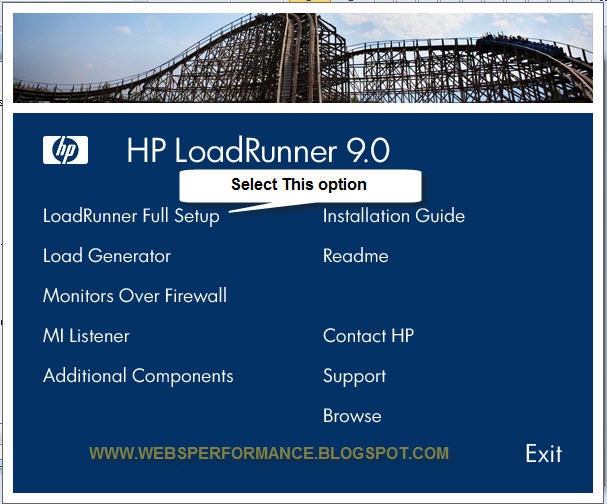
Click Next while you are prompted to install the pre-requisites for Loadrunner VUGen and agrre the terms and conditions thereafter.
After installation of prerequisites, you will be asked for selecting the type of installation. Just select "Custom" installation because we donot want to install the complete setup but VUGen.
Then you will get few options to select from. Just select "VUGenerator" and click Next. And keep clicking on Next button untill Finish.
Note:- Please do not select Controller option otherwise you have no chance to format your system after 10 days, since the license is required only for LR controller and not VUGenearator.
After complete installation you will get the following screen-

Figure 2 - Startup screen
Here we are all set to start the recording of our script. Folks, if you are prompted to enter the license key after installation, just cancel without even bothering :)..Its not going to hamper your practice anymore..;)
We will take the recording in later part... Till then you play with the installation of LR VUGen... Or if your machine is not equipped with the minimum requirements for installation, just start upgrading that. :)
Till then chao...


 Posts
Posts

